 prabs.xyz
Teaching Reachy Mini to Read Documents with On-Device AI
July 14, 2026

I’ve been building small on-device AI experiments with Reachy Mini, Pollen Robotics’ little desktop robot, and the latest one might be my favorite so far: you hand it a document, ask it to summarize it, and it actually looks down, reads it, and tells you what it says out loud.
No cloud APIs. No internet round-trip.
The entire pipeline hearing you, reading the page, understanding it, and speaking back runs locally on a MacBook Pro M4 with 16GB of memory.
The Idea
Reachy Mini sits on my desk with a camera, microphone, speaker, and an expressive head that can move naturally. That’s basically all the hardware a document-reading assistant needs. The only thing missing was the “brain.”
The goal was simple:
“Summarize this document.”
The robot handles everything else, completely hands-free.
How It Works
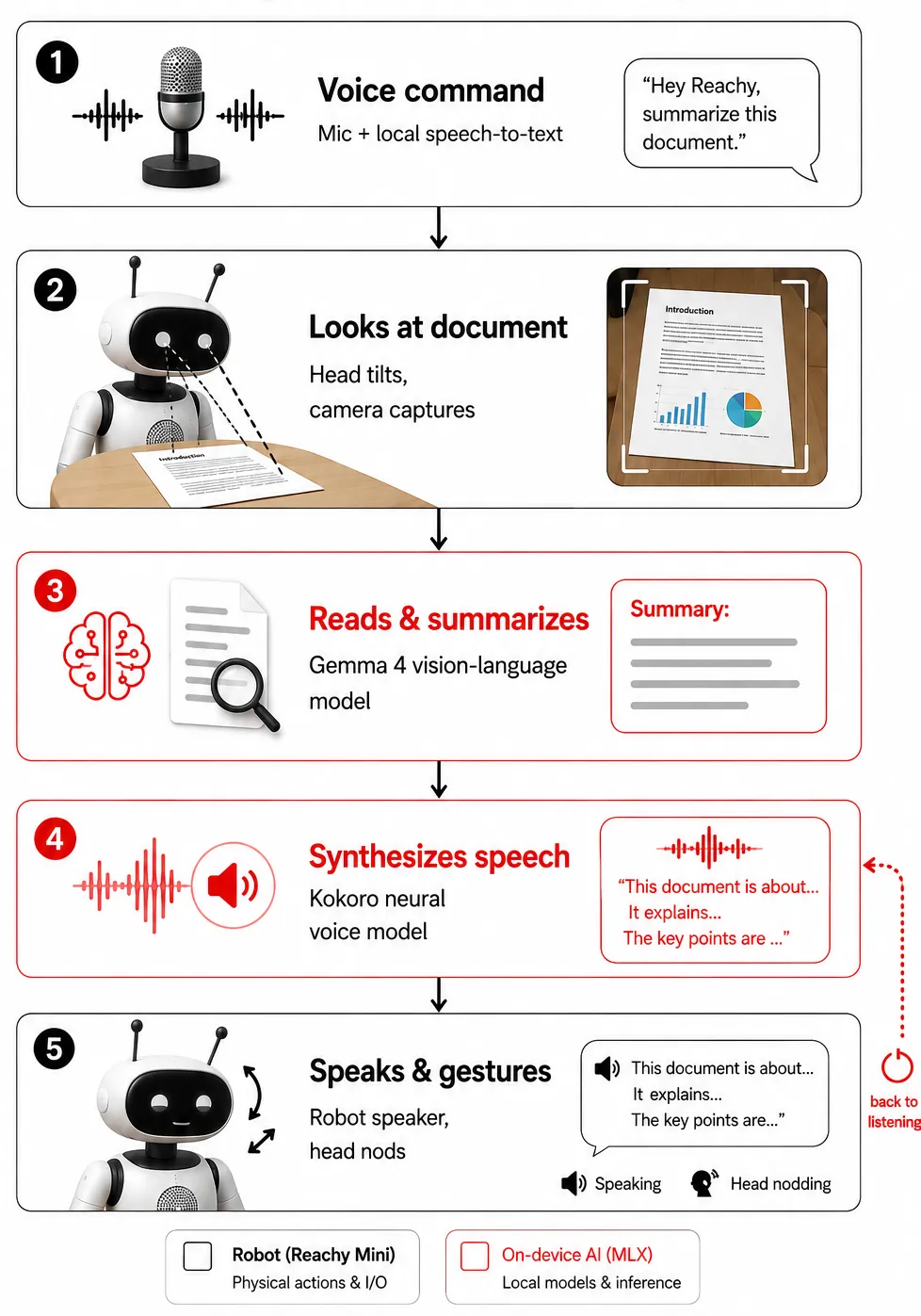
1. Listen
The robot continuously listens for a trigger phrase using a local speech-to-text model.
2. Look
Once triggered, Reachy Mini tilts its head toward the desk and captures an image of the document.
3. Read
A vision-language model analyzes the image directly. There’s no OCR pipeline or intermediate text extraction. It reads the page the way a person would and generates a natural-language summary.
4. Speak
The summary is played back through Reachy Mini’s built-in speaker using an on-device neural voice. While speaking, the robot subtly nods and tilts its head, making the interaction feel conversational rather than simply playing an audio file.
The complete loop—from saying “summarize this document” to hearing the spoken summary—takes only a few seconds, with most of the time spent understanding the document.
What’s Running Under the Hood
Everything runs locally using MLX, Apple’s machine learning framework for Apple Silicon, allowing the entire pipeline to execute on a laptop instead of a server.
Vision-Language Model
- Gemma 4 (4-bit quantized)
- Reads the photographed document directly
- Produces a concise summary
- No OCR required
Speech-to-Text
- Local Whisper model
- Converts voice commands into text
Text-to-Speech
- Compact neural voice model
- Generates natural speech entirely on-device
- Audio is played through Reachy Mini’s speaker
Robot Control
- Reachy Mini SDK
- Controls head movement
- Looks down before reading
- Adds expressive nods and subtle movements while speaking
Everything stays on-device. Nothing is sent to the cloud, and the entire system runs comfortably within 16GB of unified memory, alongside macOS.
Why This Felt Worth Building
None of the individual components are new. Whisper, vision-language models, and neural text-to-speech have all become quite capable.
What makes this project interesting is how a physical robot ties them together into an interaction that feels much more natural than simply querying an AI model.
Watching Reachy Mini look down before reading, pause while thinking, and nod while explaining makes it feel less like a smart speaker with a camera and more like a small assistant sitting on the desk beside you.
Those subtle physical behaviors contribute far more to the experience than I expected.
What’s Next
This is only the beginning.
Some ideas I’d like to explore next include:
- Reading multi-page documents
- Answering follow-up questions about what it has just read
- Maintaining context across conversations
- Reacting differently based on the type of document it sees
- Supporting diagrams, tables, and handwritten notes
For now, though, watching Reachy Mini turn its head toward a spec sheet, read it, and explain it back to me has been one of those satisfying moments where a project suddenly feels a little more alive.