 prabs.xyz
Beyond the Pixels: How Apple Reference Image Secures Truth
September 12, 2026
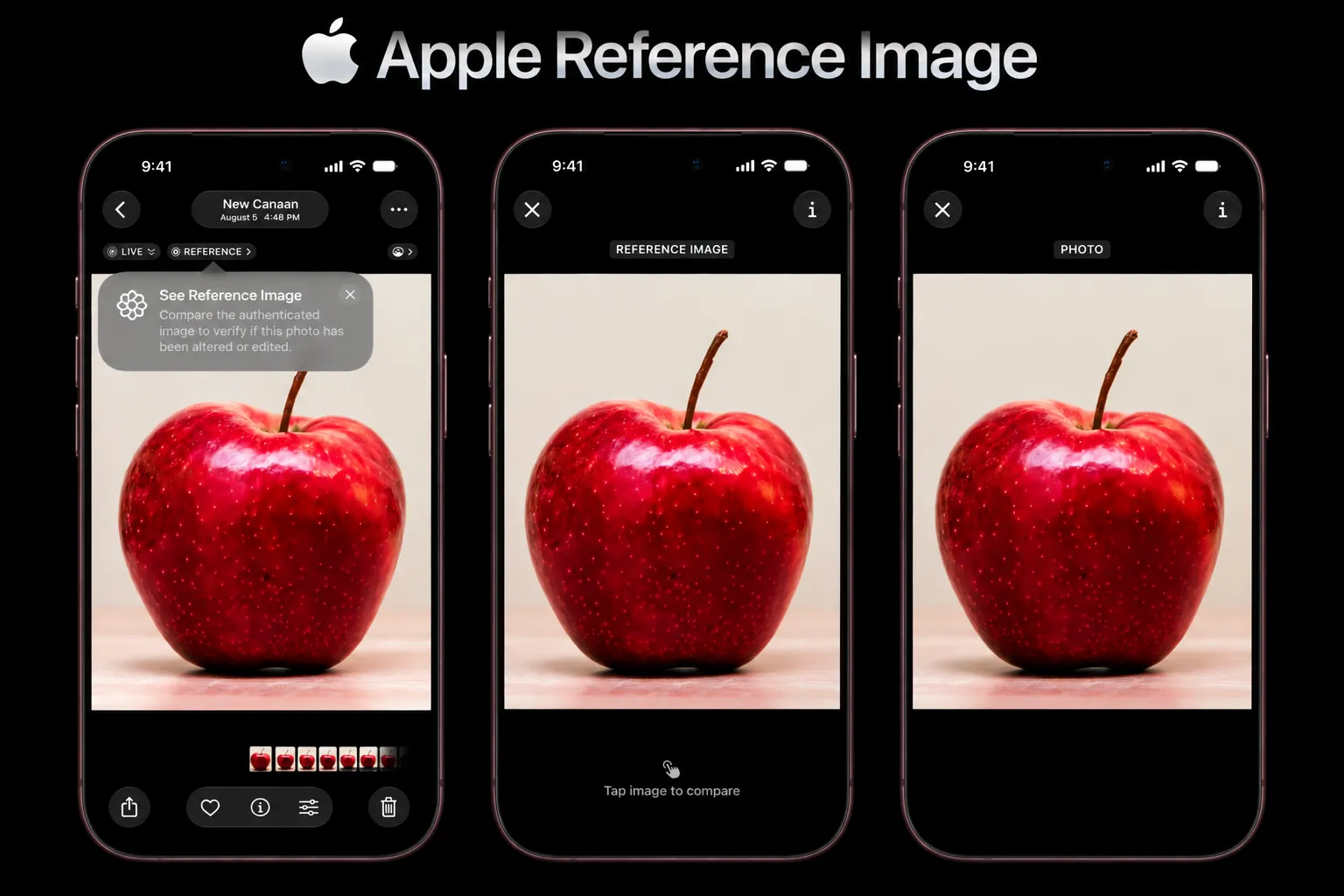 |
|---|
| Interesting, this image is generated by an AI model : ) |
In this Generative AI world, creating an image has become much easier than capturing one with a camera or creating one manually through illustration.
With the help of diffusion models, VLMs, and deepfake technologies, anyone can now generate highly realistic images based on their creative ideas.
The technology has reached a point where it is becoming increasingly difficult to tell whether an image is real or generated.
But there is another question that is even more interesting:
How do we verify the authenticity and origin of an image?
To identify an image’s originality , Google introduced a standard called SynthID where you can easily figure out whether this image is created by some generative models. SynthID embeds digital watermark in the generated content like image, audio or text. With this any system can identify whether an image is generated by AI or not.
Let’s say I have an image which is captured by camera, not altered or generated by AI.
How do I prove that this image was actually captured by a camera and hasn’t been modified?
That’s an interesting question, right?
Standard image data like EXIF meta-data can be easily altered, removed or generated which is not enough to confirm the image authenticity.
To address this problem, Apple introduced Reference Images with its iPhone 18 Pro model. It is a hardware-backed approach that establishes the authenticity of an image starting from the moment it is captured.
I’m very curious and started exploring how this engineering stuff works in real-time.
Apple Reference Images: How does it work?
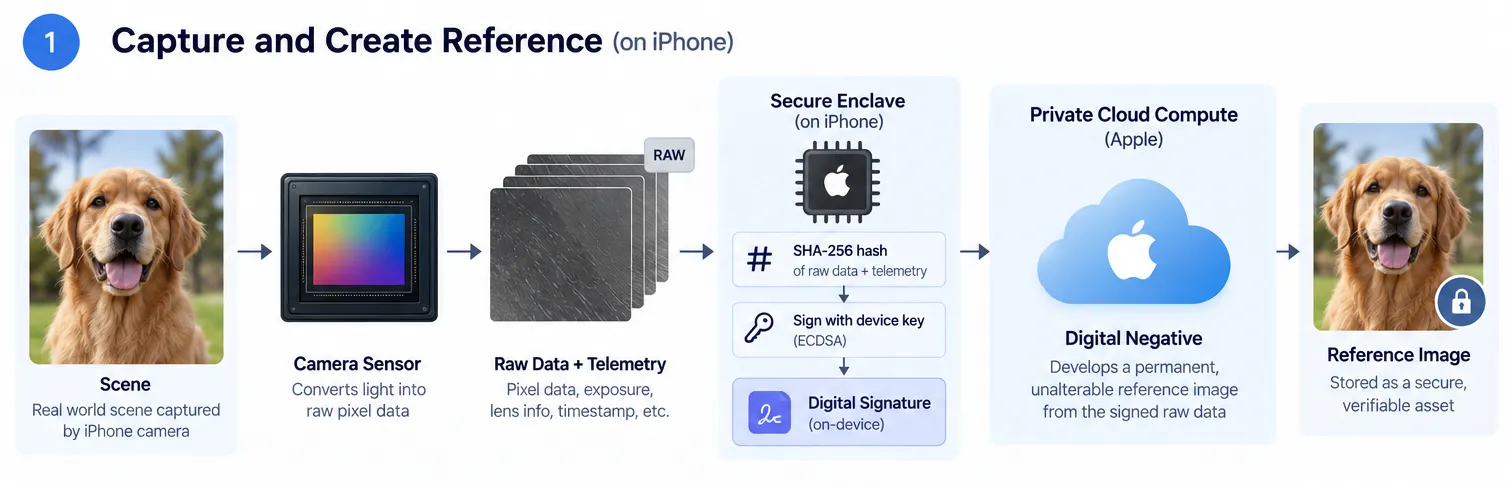
Here is a breakdown of what happens inside the hardware when you press the shutter:
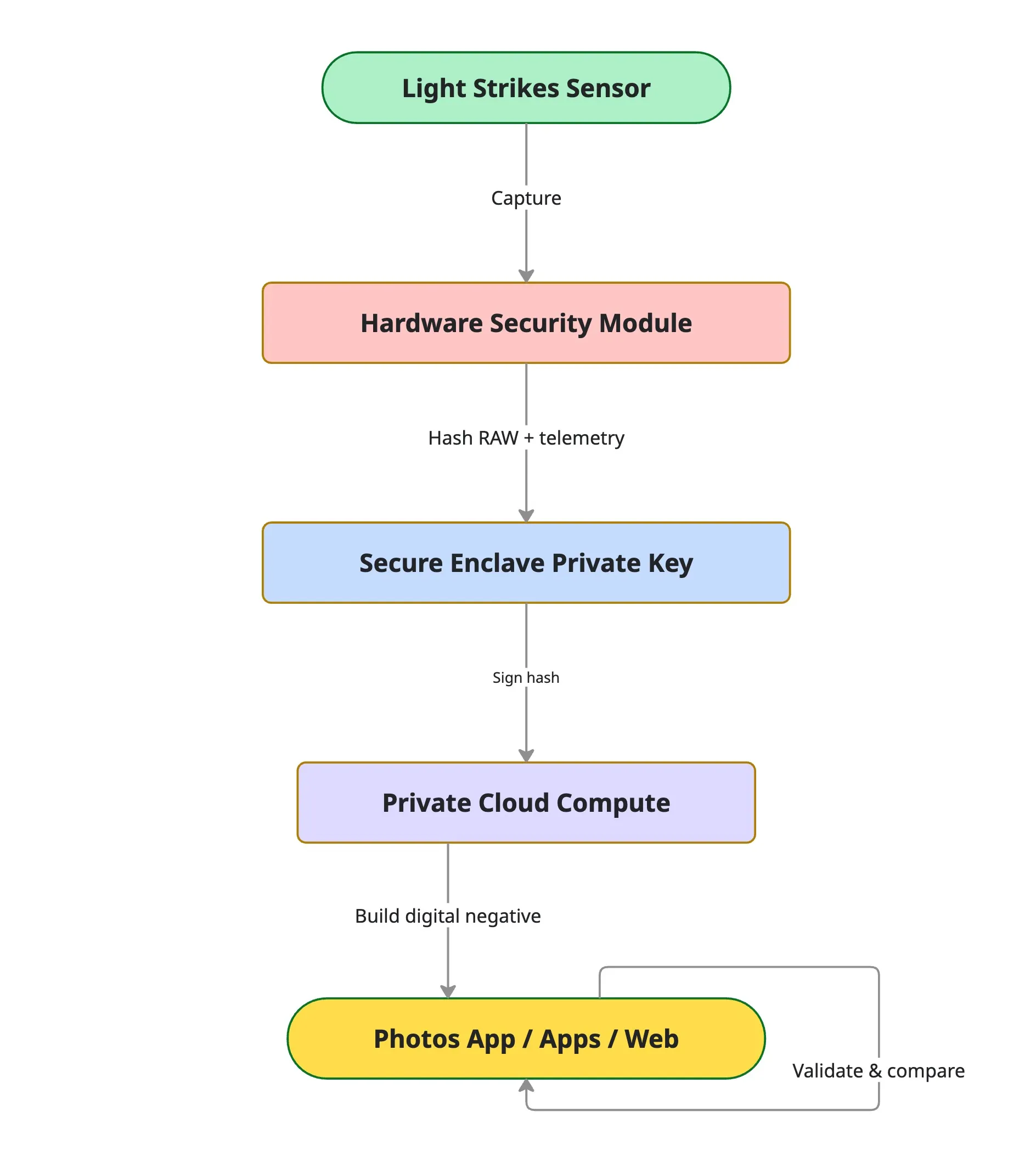
Hardware-Level Cryptography:
Instead of relying on usual software metadata like EXIF, a hardware sensor embedded in the Main camera cryptographically signs the raw image data at the exact millisecond the shutter is pressed.
Private Cloud Compute Processing:
This cryptographically signed raw data is sent to Apple’s Private Cloud Compute, which develops an unalterable, permanent “digital negative”.
Side-by-Side Verification:
In the Photos app, the original reference image is saved alongside the final edited photo. This allows you to visually compare the two side-by-side and immediately spot any AI manipulations, object removals, or retouching.
Developer APIs:
Through APIs built into iOS 27, iPadOS 27, and macOS 27, third-party photo editors, social platforms, and web browsers can verify and display these reference images natively.
Deep Dive: What Happens Inside the Hardware
1. Hardware Security Chip Integration
The camera system incorporates a dedicated Hardware Security Module (HSM) integrated directly alongside the main camera sensor.
The shutter triggers, generating 48 Megapixels of RAW sensor data along with telemetry (shutter speed 1/120s, ISO 100, f/1.7, timestamp 1789041600).
2. Instant Hash Generation
The millisecond light hits the sensor array, the chip calculates a unique mathematical hash, a cryptographic fingerprint of the raw image data and camera telemetry (including lens parameters, exposure settings, and exact timestamps) before any post-processing occurs.
Before any software ISP (Image Signal Processor) or post-processing touches the image, the Hardware Security Module runs a SHA-256 hash over the combined binary payload of RAW pixel values + metadata:
- Example Input:
0x8F3A11C9...(RAW photo data + timestamp) - Resulting Hash ():
0x4e9a3b811c7d2e...(32-byte fixed output)
3. Private Key Signing
The Secure Enclave uses an exclusive, hardware-bound private key burned into the silicon during manufacturing. It encrypts and signs the generated image hash using asymmetric cryptography.
The Secure Enclave signs the hash using its hardware-bound private key scalar :
- Select a temporary random nonce using the hardware TRNG.
- Compute point .
- Compute .
- Compute .
The resulting Signature is the pair .
{
  "reference_id": "ref_9812739182379128",
  "hash_algorithm": "SHA-256",
  "hash_value": "4e9a3b811c7d2e...",
  "signature": {
    "r": "0x7a89b02f...",
    "s": "0x1c3d4e5f..."
  },
  "public_key_cert": "https://certificates.apple.com/keys/iphone18pro_device_key.crt"
}
4. Tamper-Proof Verification
Because the signature is created inside the hardware chip using a private key that never leaves the device, no software program, image-editing software, or external computer can forge or alter the signature.
If an editor opens the photo in an app and attempts to alter a single pixel (e.g., changing pixel value 142 to 143 to remove a background object):
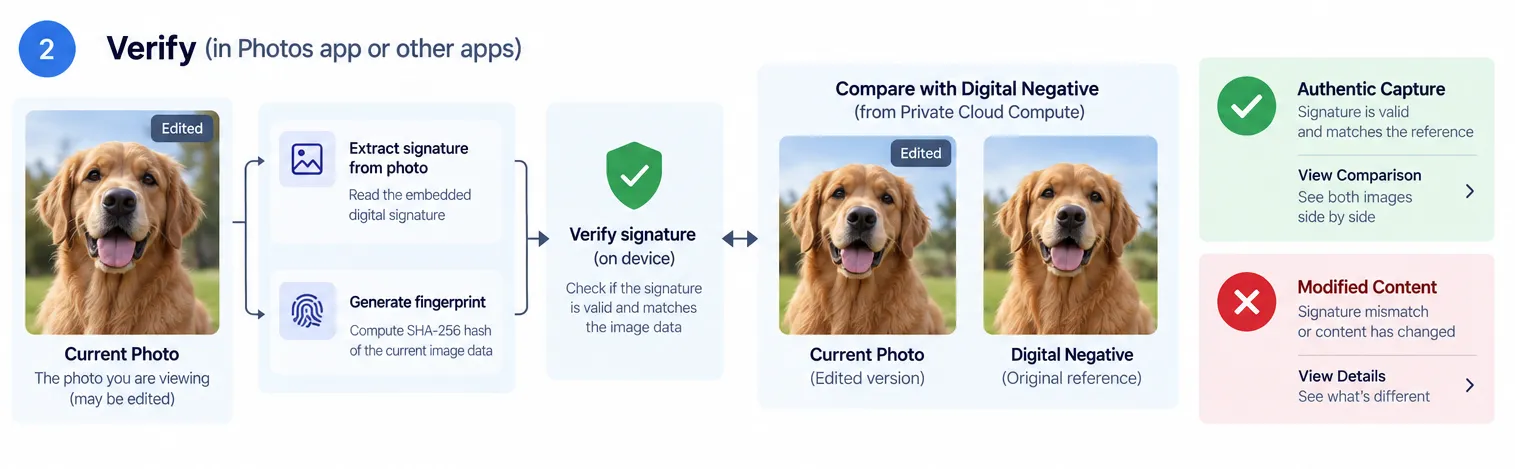
The verifier (Photos app, third-party app, or web browser) recalculates the SHA-256 hash of the current RAW payload.
Because , the mathematical equation fails to resolve. The OS immediately flags the photo: “Reference Image Signature Mismatch: Content Modified.”
Note:
This article is an engineering exploration of how Apple Reference Images could work under the hood. Apple’s proprietary implementation details are not publicly documented, so some technical details are illustrative. The cryptographic example is intended to explain the underlying concepts, not represent Apple’s actual implementation